

Documentation Index

Fetch the complete documentation index at: https://support.wepayments.com.br/llms.txt

Use this file to discover all available pages before exploring further.

Markup is a feature that allows a main merchant to generate revenue from transactions processed by their sub-merchants. It was designed for businesses that operate with franchises, partners, or any hierarchical structure where a main merchant manages the financial operation.

How Markup works

Under the markup billing model, WEpayments charges operational fees only to the main merchant. Sub-merchants do not have their own fees configured with the platform. Instead, monetization happens through a markup applied to each charge (Payin) or payout created by sub-merchants.

Simple explanation

StepWhat happens
1Sub-merchant processes a transaction
2System applies the defined markup
3Corresponding amount is automatically credited to the main merchant’s wallet

Who can use Markup?

The Markup product is available exclusively to merchants with the markup billing model enabled on their products.

Eligibility

CriteriaDetails
AvailabilityExclusive to merchants with markup billing model enabled
Applicable transactionsOnly transactions created by sub-merchants
Not applicableCharges or payouts created directly by the main merchant

Ideal for companies that:

  • Provide payment infrastructure to partners
  • Want to scale their monetization model efficiently
  • Operate with franchises, affiliates, or sub-partners
  • Need separate revenue streams for parent company and sub-entities

How Markup can be applied

How Markup works

Under the markup billing model, WEpayments charges operational fees only to the main merchant. Sub-merchants do not have their own fees configured with the platform. Instead, monetization happens through a markup applied to each charge (Payin) or payout created by sub-merchants.

Simple explanation

StepWhat happens
1Sub-merchant processes a transaction
2System applies the defined markup
3Corresponding amount is automatically credited to the main merchant’s wallet

Who can use Markup?

The Markup product is available exclusively to merchants with the markup billing model enabled on their products.

Eligibility

CriteriaDetails
AvailabilityExclusive to merchants with markup billing model enabled
Applicable transactionsOnly transactions created by sub-merchants
Not applicableCharges or payouts created directly by the main merchant

Ideal for companies that:

  • Provide payment infrastructure to partners
  • Want to scale their monetization model efficiently
  • Operate with franchises, affiliates, or sub-partners
  • Need separate revenue streams for parent company and sub-entities

How Markup can be applied

The product supports two ways of applying revenue, offering both flexibility and predictability.The product supports two ways of applying revenue, offering both flexibility and predictability.

1. Global Markup (Default)1. Global Markup (Default)

A standard rule configured at the main merchant levelA standard rule configured at the main merchant level.
AspectDescription
When appliedWhenever a transaction is created by a sub-merchant and no specific markup value is provided
BehaviorSystem automatically applies the global markup
Use caseBaseline monetization rule – ensures all transactions generate revenue

2. Inline Markup

Sent directly when creating a charge or payout.
AspectDescription
When appliedMerchant defines exact markup amount for a specific transaction
FormatPercentage-based or fixed amount
Use caseSpecial negotiations, campaigns, specific rules by product, region, or partner
PriorityAlways overrides the global markup for that transaction

Global vs. Inline Markup comparison

AspectDescription
When appliedWhenever a transaction is created by a sub-merchant and no specific markup value is provided
BehaviorSystem automatically applies the global markup
Use caseBaseline monetization rule – ensures all transactions generate revenue

2. Inline Markup

Sent directly when creating a charge or payout.
AspectDescription
When appliedMerchant defines exact markup amount for a specific transaction
FormatPercentage-based or fixed amount
Use caseSpecial negotiations, campaigns, specific rules by product, region, or partner
PriorityAlways overrides the global markup for that transaction

Global vs. Inline Markup comparison

FeatureFeatureGlobal MarkupGlobal MarkupInline MarkupInline Markup
Configuration levelConfiguration levelMain merchant (default rule)ain merchant (default rule)Per transactionPer transaction
FlexibilitylexibilityFixed baselineFixed baselineHighly flexibleHighly flexible
Override behaviorOverride behaviorUsed when no inline is providedUsed when no inline is providedOverrides global markupOverrides global markup
Best forBest forStandard, recurring transactionsStandard, recurring transactionsSpecial campaigns, negotiated dealsSpecial campaigns, negotiated deals
FormatPercentage or fixedPercentage or fixed

What happens financially?What happens financially?

After a sub-merchant’s transaction is settled, the system automatically performs the financial allocation: After a sub-merchant’s transaction is settled, the system automatically performs the financial allocation:

Financial flowFinancial flow

StepEffect
Markup amount deductedFrom the sub-merchant
Markup amount creditedTo the main merchant’s wallet
WEpayments operational feeCharged only to the main merchant
StepEffect
Markup amount deductedFrom the sub-merchant
Markup amount creditedTo the main merchant’s wallet
WEpayments operational feeCharged only to the main merchant

How it appears in statementsHow it appears in statements

Statement typeatement typeHow markup appearsHow markup appears
Sub-merchant statementSub-merchant statementSeparate line identified as “Markup” (debit)Separate line identified as “Markup” (debit)
Main merchant statementin merchant statementCredit corresponding to the transaction revenueCredit corresponding to the transaction revenue

Example scenarioExample scenario

Setup

  • Main merchant: Marketplace Operator
  • Sub-merchant: Seller João
  • Global markup: 2%
  • Transaction amount: R$ 1,000

Setup

  • Main merchant: Marketplace Operator
  • Sub-merchant: Seller João
  • Global markup: 2%
  • Transaction amount: R$ 1,000

What happensWhat happens

EventAmountWho receives/ pays
Customer pays R$ 1,000+R$ 1,000Sub-merchant (gross)
Markup (2%) applied-R$ 20Deducted from sub-merchant
Markup credited to main merchant+R$ 20Main merchant
WE fee charged-VariableMain merchant only
EventAmountWho receives/ pays
Customer pays R$ 1,000+R$ 1,000Sub-merchant (gross)
Markup (2%) applied-R$ 20Deducted from sub-merchant
Markup credited to main merchant+R$ 20Main merchant
WE fee charged-VariableMain merchant only

Net resultNet result

PartyPartyNet aNet amount
Sub-merchantSub-merchantR$ 980 (after markup)R$ 980 (after markup)
Main merchantin merchantR$ 20 (markup revenue) minus WE feesR$ 20 (markup revenue) minus WE fees

Use cases

Business modelHow Markup helps
FranchisesFranchisor earns from franchisee transactions
MarketplacesPlatform earns from seller transactions
Payment facilitatorsFacilitator earns from sub-merchant volume
Affiliate networksNetwork owner earns from affiliate sales
White-label solutionsProvider earns from partner transactions

Use cases

Business modelHow Markup helps
FranchisesFranchisor earns from franchisee transactions
MarketplacesPlatform earns from seller transactions
Payment facilitatorsFacilitator earns from sub-merchant volume
Affiliate networksNetwork owner earns from affiliate sales
White-label solutionsProvider earns from partner transactions

Important notImportant notes

NoteNoteDetailDetails
Main merchant transactionMain merchant transactionsNot subject to markup (only sub-merchant transactions)Not subject to markup (only sub-merchant transactions)
Inline markup priorityInline markup priorityAlways overrides global markupAlways overrides global markup
WE feeWE feesCharged only to main merchantCharged only to main merchant
Sub-merchant feeSub-merchant feesSub-merchants have no direct fee configuration with WEpaymentSub-merchants have no direct fee configuration with WEpayments
Markup is a feature that allows a main merchant to generate revenue from transactions processed by their sub-merchants. It was designed for businesses that operate with franchises, partners, or any hierarchical structure where a main merchant manages the financial operation.

How Markup works

Markup is a feature that allows a main merchant to generate revenue from transactions processed by their sub-merchants. It was designed for businesses that operate with franchises, partners, or any hierarchical structure where a main merchant manages the financial operation.

How Markup works

Under the markup billing model, WEpayments charges operational fees only to the main merchant. Sub-merchants do not have their own fees configured with the platform. Instead, monetization happens through a markup applied to each charge (Payin) or payout created by sub-merchants.Under the markup billing model, WEpayments charges operational fees only to the main merchant. Sub-merchants do not have their own fees configured with the platform. Instead, monetization happens through a markup applied to each charge (Payin) or payout created by sub-merchants.

Simple explanation

StepWhat happens
1Sub-merchant processes a transaction
2System applies the defined markup
3Corresponding amount is automatically credited to the main merchant’s wallet

Who can use Markup?

The Markup product is available exclusively to merchants with the markup billing model enabled on their products.

Eligibility

CriteriaDetails
AvailabilityExclusive to merchants with markup billing model enabled
Applicable transactionsOnly transactions created by sub-merchants
Not applicableCharges or payouts created directly by the main merchant

Ideal for companies that:

  • Provide payment infrastructure to partners
  • Want to scale their monetization model efficiently
  • Operate with franchises, affiliates, or sub-partners
  • Need separate revenue streams for parent company and sub-entities

How Markup can be applied

The product supports two ways of applying revenue, offering both flexibility and predictability.

1. Global Markup (Default)

A standard rule configured at the main merchant level.
AspectDescription
When appliedWhenever a transaction is created by a sub-merchant and no specific markup value is provided
BehaviorSystem automatically applies the global markup
Use caseBaseline monetization rule – ensures all transactions generate revenue

Simple explanation

StepWhat happens
1Sub-merchant processes a transaction
2System applies the defined markup
3Corresponding amount is automatically credited to the main merchant’s wallet

Who can use Markup?

The Markup product is available exclusively to merchants with the markup billing model enabled on their products.

Eligibility

CriteriaDetails
AvailabilityExclusive to merchants with markup billing model enabled
Applicable transactionsOnly transactions created by sub-merchants
Not applicableCharges or payouts created directly by the main merchant

Ideal for companies that:

  • Provide payment infrastructure to partners
  • Want to scale their monetization model efficiently
  • Operate with franchises, affiliates, or sub-partners
  • Need separate revenue streams for parent company and sub-entities

How Markup can be applied

The product supports two ways of applying revenue, offering both flexibility and predictability.

1. Global Markup (Default)

A standard rule configured at the main merchant level.
AspectDescription
When appliedWhenever a transaction is created by a sub-merchant and no specific markup value is provided
BehaviorSystem automatically applies the global markup
Use caseBaseline monetization rule – ensures all transactions generate revenue

2. Inline Markup2. Inline Markup

Sent directly when creating a charge or payoutSent directly when creating a charge or payout.
AspectDescription
When appliedMerchant defines exact markup amount for a specific transactionMerchant defines exact markup amount for a specific transaction
FormatFormatPercentage-based or fixed amountPercentage-based or fixed amount
Use caseSpecial negotiations, campaigns, specific rules by product, region, or partnerSpecial negotiations, campaigns, specific rules by product, region, or partner
PriorityAlways overrides the global markup for that transaction

Global vs. Inline Markup comparisonGlobal vs. Inline Markup comparison

FeatureGlobal MarkupInline Markup
Configuration levelMain merchant (default rule)Per transaction
FlexibilityFixed baselineHighly flexible
Override behaviorUsed when no inline is providedOverrides global markup
Best forStandard, recurring transactionsSpecial campaigns, negotiated deals
FormatPercentage or fixedPercentage or fixed

How to configurate?

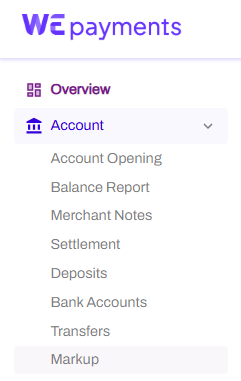
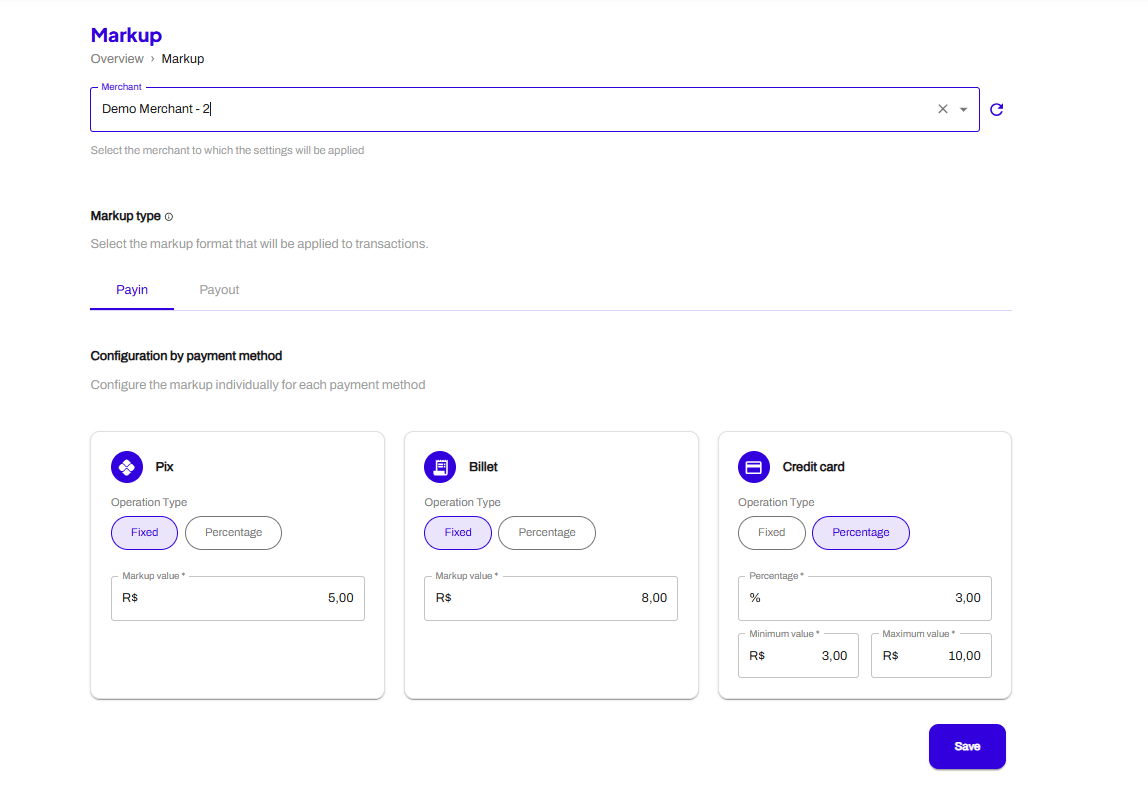
In your Portal you’ll go to the section “MarkUp” inside “Account”, there, you will chose your account and setup the Global Markup.
Captura De Tela 2026 06 01 092108
Captura De Tela 2026 06 01 092133

What happens financially?

After a sub-merchant’s transaction is settled, the system automatically performs the financial allocation:

Financial flow

StepEffect
Markup amount deductedFrom the sub-merchant
Markup amount creditedTo the main merchant’s wallet
WEpayments operational feeCharged only to the main merchant

How it appears in statements

Statement typeHow markup appears
Sub-merchant statementSeparate line identified as “Markup” (debit)
Main merchant statementCredit corresponding to the transaction revenue

Example scenario

Setup

  • Main merchant: Marketplace Operator
  • Sub-merchant: Seller João
  • Global markup: 2%
  • Transaction amount: R$ 1,000

What happens

EventAmountWho receives/ pays
Customer pays R$ 1,000+R$ 1,000Sub-merchant (gross)
Markup (2%) applied-R$ 20Deducted from sub-merchant
Markup credited to main merchant+R$ 20Main merchant
WE fee charged-VariableMain merchant only

Net result

PartyNet amount
Sub-merchantR$ 980 (after markup)
Main merchantR$ 20 (markup revenue) minus WE fees

FeatureGlobal MarkupInline Markup
Configuration levelMain merchant (default rule)Per transaction
FlexibilityFixed baselineHighly flexible
Override behaviorUsed when no inline is providedOverrides global markup
Best forStandard, recurring transactionsSpecial campaigns, negotiated deals
FormatPercentage or fixedPercentage or fixed

Use cases

Business modelHow Markup helps
FranchisesFranchisor earns from franchisee transactions
MarketplacesPlatform earns from seller transactions
Payment facilitatorsFacilitator earns from sub-merchant volume
Affiliate networksNetwork owner earns from affiliate sales
White-label solutionsProvider earns from partner transactions

Important notes

NoteDetails
Main merchant transactionsNot subject to markup (only sub-merchant transactions)
Inline markup priorityAlways overrides global markup
WE feesCharged only to main merchant
Sub-merchant feesSub-merchants have no direct fee configuration with WEpayments