Documentation Index
Fetch the complete documentation index at: https://support.wepayments.com.br/llms.txt
Use this file to discover all available pages before exploring further.
This guide provides a step-by-step walkthrough on how to request and activate custom transaction limits for strategic end users via the WEpayments Dashboard. It covers submission, risk assessment, supporting documents, status tracking, and what happens after approval.
What is Smart User Limit?
Smart User Limit is a feature that enables customized transaction limits for individual end users β whether individuals (CPF) or businesses (CNPJ). The goal is to provide greater operational predictability for businesses that serve strategic customers or users with transaction volumes above the average.
Key benefits:
| Benefit | Description |
|---|
| Reduced interruptions | Fewer transaction stops due to limit hits |
| Fewer escalations | Less manual intervention required |
| Improved customer experience | High-value customers experience less friction |
| Greater predictability | Important transactions proceed as expected |
| Better retention | Strategic users stay with your business |
When should you use Smart User Limit?
Smart User Limit is particularly useful when:
| Scenario | Description |
|---|
| Consistent history | Customer has a strong and consistent transaction history |
| Expected volume increase | Significant growth in transaction volume is anticipated |
| Strategic importance | User is strategically important to your business |
| Predictability needed | You want operational predictability |
| Prevent disruption | Avoid interruptions caused by standard limits |
π‘ By requesting a review proactively, your business can prepare for growth before the user encounters restrictions.
Step-by-step activation process
Step 1: Access the Dashboard
Log in to your WEpayments account at: https://app.wepayout.co/#/
Step 2: Navigate to the Compliance section
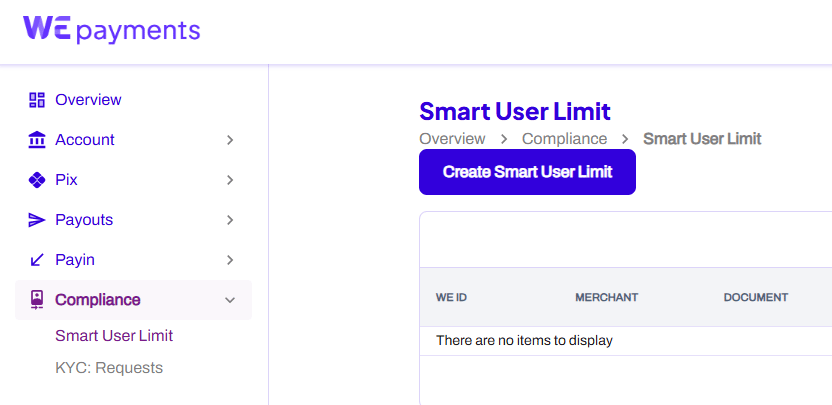
On the left sidebar, go to Compliance and click on KYC: Requests.
Step 3: Create a new request
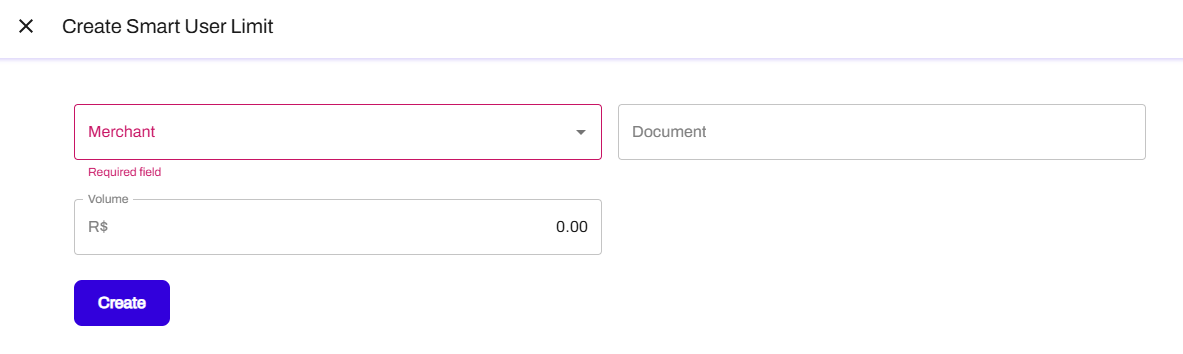
Click the button to create a new Smart User Limit request.
| Field | Description |
|---|
| Userβs CPF or CNPJ | Tax identification number of the end user |
| Desired transaction limit | The maximum amount you are requesting for this user |
| Payment account (if applicable) | Associated payment account for the request |
Step 5: Submit the request
After filling in the information, submit the request for review.
What happens after submission?
Once submitted, the request is reviewed by the WEpayments AML/CFT (Anti-Money Laundering and Counter-Terrorist Financing) team.
Risk assessment includes analysis of:
| Factor | What is evaluated |
|---|
| Financial capacity | Compatibility with requested limit |
| Transaction history | Past behavior and patterns |
| Risk scoring | Internal risk classification |
| Public legal proceedings | Court records and lawsuits |
| Adverse media screening | Negative news and mentions |
| Registration and identification data | KYC information completeness |
| Other relevant risk indicators | Additional compliance signals |
Supporting documents (if required)
Depending on the case, WEpayments may request additional information or supporting documents, such as:
- Proof of financial capacity
- Detailed transaction history
- Business relationship documentation
- Other compliance-related documents
Tracking your request status
All requests can be monitored directly through the WEpayments Dashboard > Compliance > KYC: Requests.
Request statuses
| Status | Meaning |
|---|
| Waiting | The request has been created and is awaiting review |
| Waiting for Document Upload | Additional documents are required before analysis can continue |
| Pending | Documents have been submitted and are currently under review |
| Approved | Request approved. Custom limit applied to the user |
| Cancelled | Request closed without approval or further action |
| Column | Description |
|---|
| WE ID | KYC transaction identification number generated by WEpayments |
| Beneficiary Document | CPF or CNPJ of the user |
| Merchant | Your company name |
| Reason | Why the request was created (e.g., Transaction Limit Reached, High Risk Product) |
| Beneficiary | Name of the user |
| Created at | Date the request was created |
| Updated at | Date of last change |
| Status | Current status (Waiting, Pending, Approved, etc.) |
Using filters
You can use the filter option to search for specific requests. Click the filter icon on the right side of the page to narrow down results by:
- Status
- Date range
- Beneficiary document
- Other criteria
What happens after approval?
Once approved, the user can operate within the newly authorized limit.
| Outcome | Description |
|---|
| Custom limit applied | User can transact up to the approved amount |
| Exception rules | Specific conditions may be defined per approval |
| Validity period | Approval may include a defined validity period |
π‘ After approval, transactions can continue normally up to the approved amount, resulting in a smoother experience for the end user and greater operational predictability for your business.
Important notes
| Note | Details |
|---|
| Not self-service | Requests require AML/CFT team review and approval |
| No guaranteed approval | Each request is evaluated on its own merits |
| Documentation may be required | Be prepared to provide supporting documents |
| Approval takes time | Complex cases may require additional analysis |