Settlements represent the movement of funds from processed transactions into your account balance.They provide visibility into how and when funds become available, helping you monitor financial activity and reconcile operations.
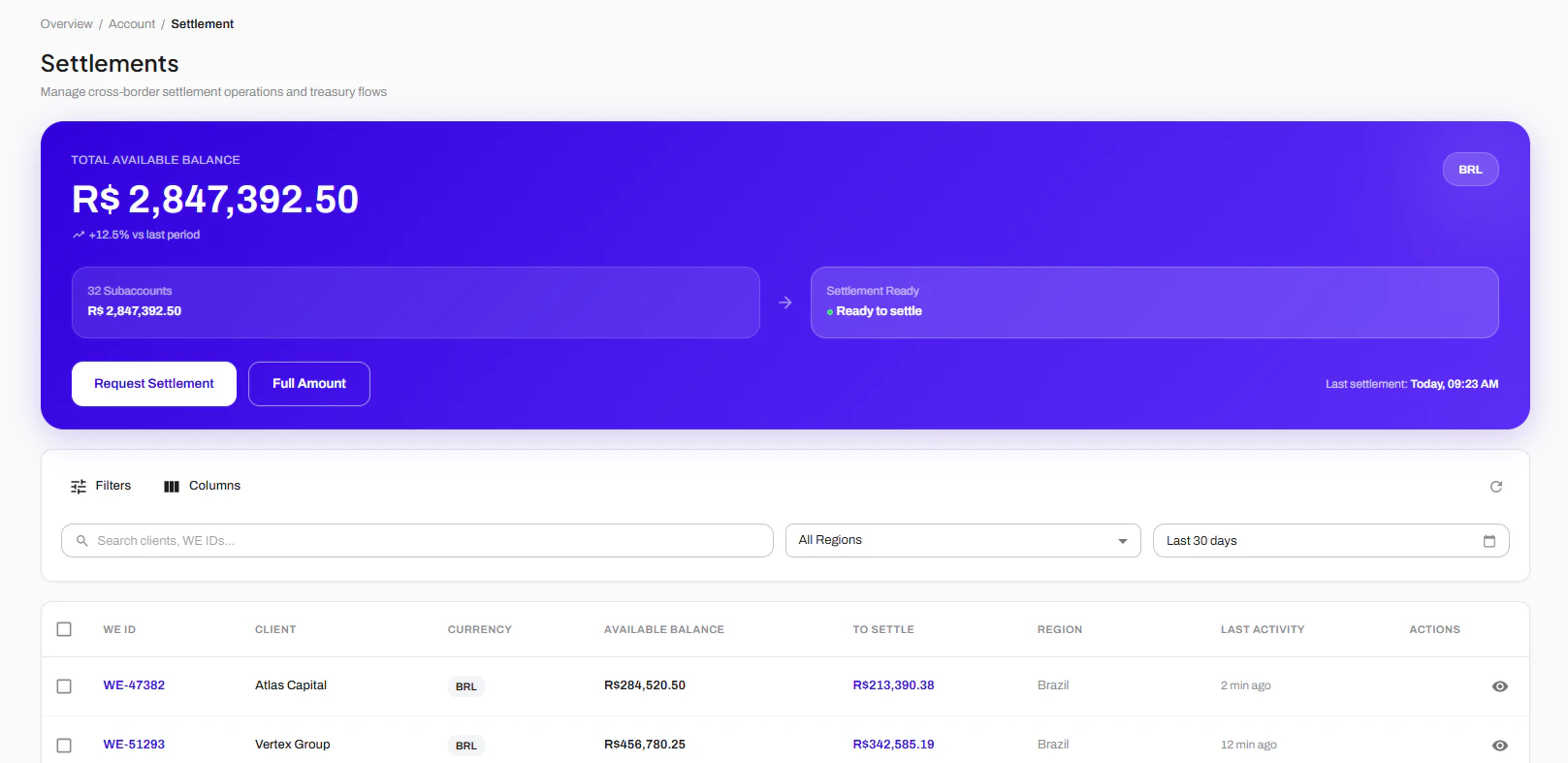
On you portal page, in the left sections, you will go to Account > Settlement. There, you can request a new settlement, chose the accounts from where you want to settle and check all balance available for settlement.
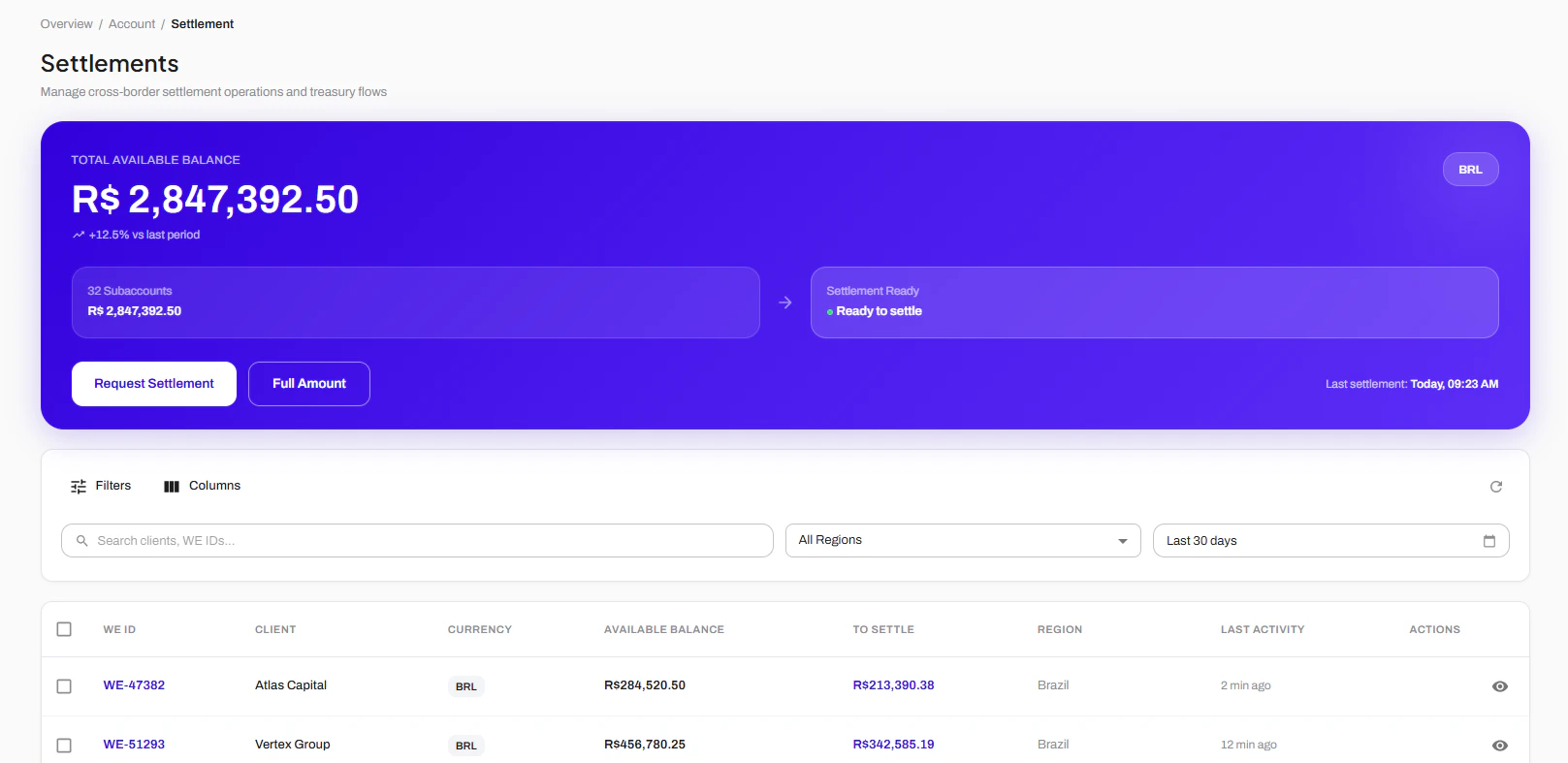
If you are a PSP will many sub-merchants and sub accounts inside your account, you can also check in this page all money available for settlement for each one of your subs.
You can chose the specific sub-accounts and the specific amount you want to settle. After choosing, you’ll press “Request Settlement” and confirm the operation.
Was this page helpful?
{"docsConfig":{"theme":"mint","$schema":"https://mintlify.com/docs.json","name":"Help Center","description":"Documentation and guides for this template—workspace setup, product how-tos, and support.","colors":{"primary":"#3200dc","light":"#3B82F6","dark":"#1E40AF"},"logo":{"light":"https://mintcdn.com/wepayments-cdc99ca4/F2e0Wa7Nl5YYlXPz/logo/light.png?fit=max\u0026auto=format\u0026n=F2e0Wa7Nl5YYlXPz\u0026q=85\u0026s=de00f123028f37387d632c6fb569aaa3","dark":"https://mintcdn.com/wepayments-cdc99ca4/F2e0Wa7Nl5YYlXPz/logo/dark.png?fit=max\u0026auto=format\u0026n=F2e0Wa7Nl5YYlXPz\u0026q=85\u0026s=20999ae86a80e483fd6e203593305eea"},"favicon":"https://mintcdn.com/wepayments-cdc99ca4/EVF3GyP8dkHFKAua/favicon.png?fit=max\u0026auto=format\u0026n=EVF3GyP8dkHFKAua\u0026q=85\u0026s=2a15e6d06c834ed8f71180f5b25350e9","navbar":{"links":[{"href":"https://docs.wepayout.co/","label":"Developer Docs"}],"primary":{"type":"button","label":"Dashboard","href":"https://app.wepayout.co/#/"}},"icons":{"library":"lucide"},"styling":{"eyebrows":"breadcrumbs","latex":false},"contextual":{"options":["copy","view","claude","mcp"],"display":"header"},"navigation":{"languages":[{"language":"en","href":"getting-started"},{"language":"pt","href":"pt/getting-started"}]}},"deployment":{"deploymentMetadataValue":{"subdomain":"wepayments-cdc99ca4","hasAudioNarration":false,"actualSubdomain":"wepayments-cdc99ca4","customDomains":["support.wepayments.com.br"],"gitSource":{"type":"gitlab","owner":"wepayout","repo":"docs-wehelp","projectId":82572979,"deployBranch":"main","contentDirectory":"","isPrivate":true,"mountPath":"","label":""},"chroma":{"liveDeploymentHistoryId":"6adb981ab0143e0b0b3ce6bc","collectionId":"c0254e98-f04e-4763-8c57-9f6bdd711fba","schemaVersion":"v3","latestBuiltDeploymentHistoryId":"6adb981ab0143e0b0b3ce6bc"},"feedback":{"thumbs":true},"entitlements":{"AI_CHAT":{"status":"DISABLED"}},"buildId":"6adb981ab0143e0b0b3ce6bc","clientVersion":"0.0.4039","searchFilterCounts":[{"language":"en","tag":"Transactions","count":14},{"language":"pt","tag":"Transações","count":14},{"language":"en","tag":"Operations \u0026 Workflows","count":8},{"language":"pt","tag":"Operações e Fluxos","count":8},{"language":"en","tag":"Cross-Border \u0026 FX","count":6},{"language":"en","tag":"Accounts and Banking","count":6},{"language":"pt","tag":"Cross-Border e Câmbio","count":6},{"language":"pt","tag":"Contas e Operações Bancárias","count":6},{"language":"en","tag":"Compliance \u0026 Limits","count":5},{"language":"en","tag":"API \u0026 Integrations","count":5},{"language":"pt","tag":"Conformidade e Limites","count":5},{"language":"pt","tag":"API e Integrações","count":5},{"language":"en","tag":"Policies and Compliance","count":4},{"language":"en","tag":"Support and FAQ","count":4},{"language":"pt","tag":"Políticas e Conformidade","count":4},{"language":"pt","tag":"Suporte e FAQ","count":4},{"language":"en","tag":"Getting started","count":3},{"language":"pt","tag":"Primeiros Passos","count":3}]},"assistantConfig":{"enableAskAiButton":false,"enableStarterQuestions":false,"enableContextualStarterQuestions":false,"enableAskAiSearchBar":true},"basePath":"","hasChatPermissions":false,"hasWebMcpPermissions":false,"toggles":[],"googleFontsInlined":false},"customCss":[{"filePath":"style.css","content":"toc-item>a{position:relative;padding-left:1rem!important}toc-item[data-active-deepest]>a::before{content:\"\";position:absolute;left:0;top:50%;width:.75rem;height:.75rem;transform:translateY(-50%);background-color:currentColor;-webkit-mask:url(\"data:image/svg+xml;utf8,\u003csvg xmlns='http://www.w3.org/2000/svg' viewBox='0 0 24 24' fill='none' stroke='currentColor' stroke-width='2.5' stroke-linecap='round' stroke-linejoin='round'>\u003cpolyline points='9 18 15 12 9 6'/>\u003c/svg>\") no-repeat center/contain;mask:url(\"data:image/svg+xml;utf8,\u003csvg xmlns='http://www.w3.org/2000/svg' viewBox='0 0 24 24' fill='none' stroke='currentColor' stroke-width='2.5' stroke-linecap='round' stroke-linejoin='round'>\u003cpolyline points='9 18 15 12 9 6'/>\u003c/svg>\") no-repeat center/contain;pointer-events:none}#navbar a[href=\"/\"] img,#navbar a[href=\"/\"] svg,#sidebar a[href=\"/\"] img,#sidebar a[href=\"/\"] svg{max-width:14rem;height:auto}#assistant-entry,#search-bar-entry,li.navbar-link>:is(a, button){background-color:rgb(249 250 251)!important;box-shadow:inset 0 0 0 1px rgb(243 244 246)!important;border:0!important;border-radius:9999px!important;height:2.25rem!important;padding:0 1rem!important}[data-component-part=products-selector-trigger]{background-color:rgb(var(--background-light))!important;box-shadow:inset 0 0 0 1px rgb(229 231 235)!important;border:0!important;border-radius:.75rem!important;height:2.25rem!important;padding:0 .75rem!important;transition:background-color .15s ease-out,box-shadow .15s ease-out!important}.nav-dropdown-products-selector-item-icon{background-color:rgb(var(--primary))!important;color:#fff!important;border-radius:.375rem!important;aspect-ratio:1}[data-component-part=products-selector-trigger]{position:relative;--icon-left-offset:0.05rem}#assistant-entry,#search-bar-entry{transition:opacity .15s ease-out;body:has(#custom-homepage-assistant-entry) \u0026 {\n opacity: 0;\n pointer-events: none;\n }}#topbar-cta-button{background:0 0!important;box-shadow:none!important;padding:0!important;height:auto!important}ul:is(:has(> #topbar-cta-button), :has(> li.navbar-link)){gap:.25rem!important}.columns.suggested-articles{gap:1.5rem 2rem}"}],"page":{"pagePath":"getting-started/workspace/settlements","slug":"/getting-started/workspace/settlements","pageMetadata":{"title":"Creating Settlements","description":null,"href":"/getting-started/workspace/settlements"},"pageType":"default","mdx":{"mdxSource":{"compiledSource":"\"use strict\";const{Fragment:_Fragment,jsx:_jsx,jsxs:_jsxs}=arguments[0];const{useMDXComponents:_provideComponents}=arguments[0];function _createMdxContent(props){const _components={p:`p`,strong:`strong`,..._provideComponents(),...props.components},{Frame,Heading,OptimizedImage}=_components;if(!Frame)_missingMdxReference(`Frame`,true);if(!Heading)_missingMdxReference(`Heading`,true);if(!OptimizedImage)_missingMdxReference(`OptimizedImage`,true);return _jsxs(_Fragment,{children:[_jsx(_components.p,{children:`Settlements represent the movement of funds from processed transactions into your account balance.`}),`\n`,_jsx(_components.p,{children:`They provide visibility into how and when funds become available, helping you monitor financial activity and reconcile operations.`}),`\n`,_jsx(Heading,{level:`2`,id:`how-to-create-a-settlement`,children:_jsx(_components.strong,{children:`How to create a Settlement`})}),`\n`,_jsx(_components.p,{children:`On you portal page, in the left sections, you will go to Account > Settlement. There, you can request a new settlement, chose the accounts from where you want to settle and check all balance available for settlement.\\xA0`}),`\n`,_jsx(Frame,{children:_jsx(OptimizedImage,{src:`https://mintcdn.com/wepayments-cdc99ca4/mhtR-6yUVHvEDKea/images/image.png?fit=max\u0026auto=format\u0026n=mhtR-6yUVHvEDKea\u0026q=85\u0026s=378591a36bbbebfde520c5a098dc3abe`,alt:`Image`,\"data-og-width\":`1617`,width:`1617`,\"data-og-height\":`787`,height:`787`,\"data-path\":`images/image.png`,\"data-optimize\":`true`,\"data-opv\":`3`,srcset:`https://mintcdn.com/wepayments-cdc99ca4/mhtR-6yUVHvEDKea/images/image.png?w=280\u0026fit=max\u0026auto=format\u0026n=mhtR-6yUVHvEDKea\u0026q=85\u0026s=51f6a6189fecdbd87f84c77933bc282c 280w, https://mintcdn.com/wepayments-cdc99ca4/mhtR-6yUVHvEDKea/images/image.png?w=560\u0026fit=max\u0026auto=format\u0026n=mhtR-6yUVHvEDKea\u0026q=85\u0026s=47f8295a099cdd52ff4f8bbb76a1d00b 560w, https://mintcdn.com/wepayments-cdc99ca4/mhtR-6yUVHvEDKea/images/image.png?w=840\u0026fit=max\u0026auto=format\u0026n=mhtR-6yUVHvEDKea\u0026q=85\u0026s=a314c73cd19f5a38c6fae17a65876077 840w, https://mintcdn.com/wepayments-cdc99ca4/mhtR-6yUVHvEDKea/images/image.png?w=1100\u0026fit=max\u0026auto=format\u0026n=mhtR-6yUVHvEDKea\u0026q=85\u0026s=e59e1ab8f231ccb415f6a9016f80901e 1100w, https://mintcdn.com/wepayments-cdc99ca4/mhtR-6yUVHvEDKea/images/image.png?w=1650\u0026fit=max\u0026auto=format\u0026n=mhtR-6yUVHvEDKea\u0026q=85\u0026s=66b6529bc294472313d5534632539239 1650w, https://mintcdn.com/wepayments-cdc99ca4/mhtR-6yUVHvEDKea/images/image.png?w=2500\u0026fit=max\u0026auto=format\u0026n=mhtR-6yUVHvEDKea\u0026q=85\u0026s=1ad8b2fb03489e65406bd930ac6887f7 2500w`})}),`\n`,_jsx(_components.p,{children:`If you are a PSP will many sub-merchants and sub accounts inside your account, you can also check in this page all money available for settlement for each one of your subs.`}),`\n`,_jsx(Frame,{children:_jsx(OptimizedImage,{src:`https://mintcdn.com/wepayments-cdc99ca4/mhtR-6yUVHvEDKea/images/Captura-de-tela-2026-05-28-154354.png?fit=max\u0026auto=format\u0026n=mhtR-6yUVHvEDKea\u0026q=85\u0026s=1999fe644b35a1db25c4c43625af1d64`,alt:`Captura De Tela 2026 05 28 154354`,\"data-og-width\":`1617`,width:`1617`,\"data-og-height\":`787`,height:`787`,\"data-path\":`images/Captura-de-tela-2026-05-28-154354.png`,\"data-optimize\":`true`,\"data-opv\":`3`,srcset:`https://mintcdn.com/wepayments-cdc99ca4/mhtR-6yUVHvEDKea/images/Captura-de-tela-2026-05-28-154354.png?w=280\u0026fit=max\u0026auto=format\u0026n=mhtR-6yUVHvEDKea\u0026q=85\u0026s=bcd8c03b6b10840e28a2124a0e1dd651 280w, https://mintcdn.com/wepayments-cdc99ca4/mhtR-6yUVHvEDKea/images/Captura-de-tela-2026-05-28-154354.png?w=560\u0026fit=max\u0026auto=format\u0026n=mhtR-6yUVHvEDKea\u0026q=85\u0026s=f175c4d8e1c8659a816e3f5622db2874 560w, https://mintcdn.com/wepayments-cdc99ca4/mhtR-6yUVHvEDKea/images/Captura-de-tela-2026-05-28-154354.png?w=840\u0026fit=max\u0026auto=format\u0026n=mhtR-6yUVHvEDKea\u0026q=85\u0026s=6a69bec95098e509bdd4f12c2f006827 840w, https://mintcdn.com/wepayments-cdc99ca4/mhtR-6yUVHvEDKea/images/Captura-de-tela-2026-05-28-154354.png?w=1100\u0026fit=max\u0026auto=format\u0026n=mhtR-6yUVHvEDKea\u0026q=85\u0026s=7f57a5136b135b478d5c40d895322654 1100w, https://mintcdn.com/wepayments-cdc99ca4/mhtR-6yUVHvEDKea/images/Captura-de-tela-2026-05-28-154354.png?w=1650\u0026fit=max\u0026auto=format\u0026n=mhtR-6yUVHvEDKea\u0026q=85\u0026s=16f724d4509163ca56d397642f667833 1650w, https://mintcdn.com/wepayments-cdc99ca4/mhtR-6yUVHvEDKea/images/Captura-de-tela-2026-05-28-154354.png?w=2500\u0026fit=max\u0026auto=format\u0026n=mhtR-6yUVHvEDKea\u0026q=85\u0026s=5292039b07060f772168e51e1d48c780 2500w`})}),`\n`,_jsx(_components.p,{children:`You can chose the specific sub-accounts and the specific amount you want to settle. After choosing, you’ll press “Request Settlement” and confirm the operation.`})]})}function MDXContent(props={}){const{wrapper:MDXLayout}={..._provideComponents(),...props.components};return MDXLayout?_jsx(MDXLayout,{...props,children:_jsx(_createMdxContent,{...props})}):_createMdxContent(props)}return{default:MDXContent};function _missingMdxReference(id,component){throw new Error(`Expected `+(component?`component`:`object`)+\" `\"+id+\"` to be defined: you likely forgot to import, pass, or provide it.\")}","frontmatter":{},"scope":{"config":{},"pageMetadata":{"title":"Creating Settlements","description":null,"href":"/getting-started/workspace/settlements"}}},"mdxSourceWithNoJs":null},"mdxExtracts":{"tableOfContents":[{"title":"How to create a Settlement","slug":"how-to-create-a-settlement","depth":2,"children":[]}],"codeExamples":{}},"jsLinks":["/_mintlify/custom/wepayments-cdc99ca4/eaffec8e65cd9c3a/search.js"],"subdomain":"wepayments-cdc99ca4","siteName":"Help Center","title":"Creating Settlements - Help Center","navMaps":{"firstHrefInVersion":{},"firstHrefInLanguage":{"en":{"href":"/getting-started/workspace/settlements","matchLevel":0},"pt":{"href":"/pt/getting-started/workspace/settlements","matchLevel":1}}},"lastModified":"2026-09-15T13:57:46.374Z","originalFileLocation":"getting-started/workspace/settlements.mdx","locale":"en"},"headHtml":"\u003cscript data-mint-head>(function(){var d=document.documentElement,p=null;if(!p){try{p=localStorage.getItem(\"isDarkMode\")}catch(e){}if(p==='true')p='dark';else if(p==='false')p='light';if(p!=='light'\u0026\u0026p!=='dark'\u0026\u0026p!=='system')p=\"system\"}var r=p==='system'?(matchMedia(\"(prefers-color-scheme: dark)\").matches?'dark':'light'):p;d.classList.remove(r==='dark'?'light':'dark');d.classList.add(r);d.setAttribute(\"data-theme-preference\",p)})();\u003c/script>\u003cmeta data-mint-head name=\"application-name\" content=\"Help Center\">\u003cmeta data-mint-head name=\"generator\" content=\"Mintlify\">\u003clink data-mint-head rel=\"icon\" type=\"image/png\" sizes=\"192x192\" href=\"/mintlify-assets/_mintlify/favicons/wepayments-cdc99ca4/qOiP4qFzKQp11a4G/_generated/favicon/android-chrome-192x192.png\" media=\"(prefers-color-scheme: light)\">\u003clink data-mint-head rel=\"apple-touch-icon\" type=\"image/png\" sizes=\"180x180\" href=\"/mintlify-assets/_mintlify/favicons/wepayments-cdc99ca4/qOiP4qFzKQp11a4G/_generated/favicon/apple-touch-icon.png\">\u003clink data-mint-head rel=\"icon\" type=\"image/png\" sizes=\"16x16\" href=\"/mintlify-assets/_mintlify/favicons/wepayments-cdc99ca4/qOiP4qFzKQp11a4G/_generated/favicon/favicon-16x16.png\" media=\"(prefers-color-scheme: light)\">\u003clink data-mint-head rel=\"icon\" type=\"image/png\" sizes=\"32x32\" href=\"/mintlify-assets/_mintlify/favicons/wepayments-cdc99ca4/qOiP4qFzKQp11a4G/_generated/favicon/favicon-32x32.png\" media=\"(prefers-color-scheme: light)\">\u003clink data-mint-head rel=\"shortcut icon\" type=\"image/x-icon\" href=\"/mintlify-assets/_mintlify/favicons/wepayments-cdc99ca4/qOiP4qFzKQp11a4G/_generated/favicon/favicon.ico\" media=\"(prefers-color-scheme: light)\">\u003clink data-mint-head rel=\"icon\" type=\"image/png\" sizes=\"192x192\" href=\"/mintlify-assets/_mintlify/favicons/wepayments-cdc99ca4/qOiP4qFzKQp11a4G/_generated/favicon-dark/android-chrome-192x192.png\" media=\"(prefers-color-scheme: dark)\">\u003clink data-mint-head rel=\"icon\" type=\"image/png\" sizes=\"16x16\" href=\"/mintlify-assets/_mintlify/favicons/wepayments-cdc99ca4/qOiP4qFzKQp11a4G/_generated/favicon-dark/favicon-16x16.png\" media=\"(prefers-color-scheme: dark)\">\u003clink data-mint-head rel=\"icon\" type=\"image/png\" sizes=\"32x32\" href=\"/mintlify-assets/_mintlify/favicons/wepayments-cdc99ca4/qOiP4qFzKQp11a4G/_generated/favicon-dark/favicon-32x32.png\" media=\"(prefers-color-scheme: dark)\">\u003clink data-mint-head rel=\"shortcut icon\" type=\"image/x-icon\" href=\"/mintlify-assets/_mintlify/favicons/wepayments-cdc99ca4/qOiP4qFzKQp11a4G/_generated/favicon-dark/favicon.ico\" media=\"(prefers-color-scheme: dark)\">\u003cmeta data-mint-head property=\"og:title\" content=\"Creating Settlements - Help Center\">\u003cmeta data-mint-head property=\"og:site_name\" content=\"Help Center\">\u003cmeta data-mint-head property=\"og:url\" content=\"https://support.wepayments.com.br/getting-started/workspace/settlements\">\u003cmeta data-mint-head property=\"og:type\" content=\"website\">\u003cmeta data-mint-head property=\"og:image\" content=\"https://wepayments-cdc99ca4.mintlify.app/_mintlify/api/og/v2?division=Accounts+and+Banking\u0026amp;title=Creating+Settlements\u0026amp;theme=003378959e943941b14e285e\u0026amp;signature=a643d8796864993e5984d368d448df1fec9a36d65a01631a123ef2b6cd03c82e\">\u003cmeta data-mint-head property=\"og:image:width\" content=\"1200\">\u003cmeta data-mint-head property=\"og:image:height\" content=\"630\">\u003cmeta data-mint-head name=\"twitter:card\" content=\"summary_large_image\">\u003cmeta data-mint-head name=\"twitter:title\" content=\"Creating Settlements - Help Center\">\u003cmeta data-mint-head name=\"twitter:image\" content=\"https://wepayments-cdc99ca4.mintlify.app/_mintlify/api/og/v2?division=Accounts+and+Banking\u0026amp;title=Creating+Settlements\u0026amp;theme=003378959e943941b14e285e\u0026amp;signature=a643d8796864993e5984d368d448df1fec9a36d65a01631a123ef2b6cd03c82e\">\u003cmeta data-mint-head name=\"twitter:image:width\" content=\"1200\">\u003cmeta data-mint-head name=\"twitter:image:height\" content=\"630\">\u003cmeta data-mint-head name=\"msapplication-config\" content=\"/mintlify-assets/_mintlify/favicons/wepayments-cdc99ca4/qOiP4qFzKQp11a4G/_generated/favicon/browserconfig.xml\">\u003cmeta data-mint-head name=\"apple-mobile-web-app-title\" content=\"Help Center\">\u003cmeta data-mint-head name=\"msapplication-TileColor\" content=\"#3200dc\">\u003clink data-mint-head rel=\"canonical\" href=\"https://support.wepayments.com.br/getting-started/workspace/settlements\">\u003clink data-mint-head rel=\"alternate\" type=\"application/xml\" href=\"/sitemap.xml\">\u003clink data-mint-head rel=\"alternate\" type=\"text/markdown\" href=\"/getting-started/workspace/settlements.md\">\u003clink data-mint-head rel=\"alternate\" hreflang=\"en\" href=\"https://support.wepayments.com.br/getting-started/workspace/settlements\">\u003clink data-mint-head rel=\"alternate\" hreflang=\"pt\" href=\"https://support.wepayments.com.br/pt/getting-started/workspace/settlements\">\u003clink data-mint-head rel=\"alternate\" hreflang=\"x-default\" href=\"https://support.wepayments.com.br/getting-started/workspace/settlements\">\u003cscript data-mint-head type=\"application/ld+json\">{\"@context\":\"https://schema.org\",\"@graph\":[{\"@type\":\"Organization\",\"@id\":\"https://support.wepayments.com.br/#organization\",\"name\":\"Help Center\",\"url\":\"https://support.wepayments.com.br\",\"logo\":{\"@type\":\"ImageObject\",\"url\":\"https://mintcdn.com/wepayments-cdc99ca4/F2e0Wa7Nl5YYlXPz/logo/light.png?fit=max\u0026auto=format\u0026n=F2e0Wa7Nl5YYlXPz\u0026q=85\u0026s=de00f123028f37387d632c6fb569aaa3\"}},{\"@type\":\"WebSite\",\"@id\":\"https://support.wepayments.com.br#website\",\"name\":\"Help Center\",\"url\":\"https://support.wepayments.com.br\",\"publisher\":{\"@id\":\"https://support.wepayments.com.br/#organization\"}},{\"@type\":\"WebPage\",\"@id\":\"https://support.wepayments.com.br/getting-started/workspace/settlements#webpage\",\"url\":\"https://support.wepayments.com.br/getting-started/workspace/settlements\",\"name\":\"Creating Settlements\",\"dateModified\":\"2026-09-15T13:57:46.374Z\",\"isPartOf\":{\"@id\":\"https://support.wepayments.com.br#website\"},\"breadcrumb\":{\"@id\":\"https://support.wepayments.com.br/getting-started/workspace/settlements#breadcrumb\"}},{\"@type\":\"BreadcrumbList\",\"@id\":\"https://support.wepayments.com.br/getting-started/workspace/settlements#breadcrumb\",\"itemListElement\":[{\"@type\":\"ListItem\",\"position\":1,\"name\":\"Accounts and Banking\",\"item\":\"https://support.wepayments.com.br/getting-started/workspace/index\"},{\"@type\":\"ListItem\",\"position\":2,\"name\":\"Creating Settlements\",\"item\":\"https://support.wepayments.com.br/getting-started/workspace/settlements\"}]},{\"@type\":[\"Article\",\"TechArticle\"],\"@id\":\"https://support.wepayments.com.br/getting-started/workspace/settlements#article\",\"headline\":\"Creating Settlements\",\"name\":\"Creating Settlements\",\"url\":\"https://support.wepayments.com.br/getting-started/workspace/settlements\",\"mainEntityOfPage\":{\"@id\":\"https://support.wepayments.com.br/getting-started/workspace/settlements#webpage\"},\"dateModified\":\"2026-09-15T13:57:46.374Z\",\"publisher\":{\"@id\":\"https://support.wepayments.com.br/#organization\"},\"isPartOf\":{\"@id\":\"https://support.wepayments.com.br#website\"}}]}\u003c/script>\u003cscript data-mint-head type=\"application/ld+json\">{\"@context\":\"https://schema.org\",\"@type\":\"WebSite\",\"name\":\"Help Center\",\"creator\":{\"@type\":\"Organization\",\"name\":\"Mintlify\",\"url\":\"https://mintlify.com\"}}\u003c/script>","siteName":"Help Center","nav":{"global":null,"languages":[{"language":"en","pages":[{"group":"Getting started","icon":"rocket","root":{"title":"Welcome to WEpayments","sidebarTitle":"Overview","href":"/getting-started"},"expanded":true,"pages":[{"title":"Our Solutions","href":"/getting-started/oursolutions"},{"title":"Understanding Your Operations","href":"/getting-started/understanding-your-operations"},{"title":"Explore our Help Center","href":"/getting-started/explore"}]},{"group":"Support and FAQ","icon":"headset","root":{"title":"Support and FAQ","sidebarTitle":"Overview","href":"/support/faq/index"},"pages":[{"title":"Common Questions FAQ","sidebarTitle":"Common Questions","href":"/support/faq/common-questions"},{"title":"Account and Access FAQ","sidebarTitle":"Account \u0026 Access","href":"/support/faq/account-access"},{"title":"Payments FAQ","sidebarTitle":"Payments FAQ","href":"/support/faq/payments-faq"},{"title":"Contact Support","sidebarTitle":"Contact Support","href":"/support/faq/contact-support"}]},{"group":"Policies and Compliance","icon":"shield-check","root":{"title":"Policies and Compliance","sidebarTitle":"Overview","href":"/policies/index"},"pages":[{"title":"Regulatory Requirements","sidebarTitle":"Regulatory Requirements","href":"/policies/regulatory"},{"title":"AML and KYC/KYB","sidebarTitle":"AML \u0026 KYC/KYB","href":"/policies/aml-kyc"},{"title":"Data Protection","sidebarTitle":"Data Protection","href":"/policies/data-protection"},{"title":"Operational Guidelines","sidebarTitle":"Operational Guidelines","href":"/policies/operational-guidelines"}]},{"group":"Accounts and Banking","icon":"badge-dollar-sign","root":{"title":"Accounts and Banking","sidebarTitle":"Overview","href":"/getting-started/workspace/index"},"pages":[{"title":"Understanding Brazilian Bank Accounts","href":"/getting-started/workspace/understanding-brl-accounts"},{"title":"Managing Companies","href":"/getting-started/workspace/managing-companies"},{"title":"Managing Deposits","href":"/getting-started/workspace/managing-deposits"},{"title":"Understanding Balance Consolidation","description":null,"href":"/getting-started/workspace/balance-consolidation"},{"title":"Creating Settlements","href":"/getting-started/workspace/settlements"},{"title":"Understanding Statements and Balance Reports","description":null,"href":"/getting-started/workspace/statements-reports"}]},{"group":"Transactions","icon":"credit-card","root":{"title":"Transactions","sidebarTitle":"Overview","href":"/getting-started/billing/index"},"pages":[{"title":"Payin Overview","href":"/getting-started/billing/payin-overview"},{"title":"How to Create a Payin in the Dashboard ","href":"/getting-started/billing/create-payin"},{"title":"Payin Management: Cancellation, Refunds, Reports and more","href":"/getting-started/billing/payin-management"},{"title":"MarkUp: What it is and How to use","href":"/getting-started/billing/markup-management"},{"title":"Payout Overview","href":"/getting-started/billing/payout-overview"},{"title":"Payout Requirements","href":"/getting-started/billing/payout-requirements"},{"title":"Payout execution","href":"/getting-started/billing/payout-execution"},{"title":"Settlement Page: how to request withdrawals for your accounts","href":"/untitled-page-3"},{"title":"Monitoring and Risk Overview","href":"/getting-started/billing/monitoring-risk"},{"title":"Transactions Under Review","href":"/getting-started/billing/transactions-review"},{"title":"Transactions Lifecycle","href":"/getting-started/billing/transactions-lifecycle"},{"title":"Exceptions and Failure Handling","href":"/getting-started/billing/exceptions-failure"},{"title":"Monitoring vs. Reprocessing","href":"/getting-started/billing/monitoring-reprocessing"},{"title":"Reporting and Reconciliation","href":"/getting-started/billing/reporting-reconciliation"}]},{"group":"Cross-Border \u0026 FX","icon":"euro","root":{"title":"Cross-Border and FX","sidebarTitle":"Overview","href":"/getting-started/integrations/developer/index"},"pages":[{"title":"Stablecoin Settlement","href":"/getting-started/integrations/developer/crypto-settlement"},{"title":"Crossborder Payments Overview","href":"/getting-started/integrations/developer/crossborder-overview"},{"title":"Foreign Exchange (FX) Overview","href":"/getting-started/integrations/developer/fx-overview"},{"title":"Crossborder Compliance Requirements","href":"/getting-started/integrations/developer/crossborder-requirements"},{"title":"CBD (Cannabidiol) Transactions and Operation","href":"/getting-started/integrations/developer/crossborder-cbd"},{"title":"Conversion Fee: how automatic charging works for cross-border operations","href":"/untitled-page-2"}]},{"group":"Compliance \u0026 Limits","icon":"folder-kanban","root":{"title":"Compliance \u0026 Limits","sidebarTitle":"Overview","href":"/product/projects/index"},"pages":[{"title":"Transaction Limits Overview","href":"/product/projects/transactions-limit"},{"title":"Smart User Limit Activation","href":"/product/projects/smartuserlimit-register"},{"title":"Restrictive Lists and Screening","href":"/product/projects/restrictive-lists"},{"title":"Anti-Fraud and MED Notifications","href":"/product/projects/antifraud-med"},{"title":"Compliance Reviews","href":"/product/projects/compliance-review"}]},{"group":"Operations \u0026 Workflows","icon":"wrench","root":{"title":"Operations and Workflows","sidebarTitle":"Overview","href":"/support/troubleshooting/index"},"pages":[{"title":"Operation Overview","href":"/support/troubleshooting/operation-overview"},{"title":"Mass Payments","href":"/support/troubleshooting/mass-payments"},{"title":"Workflow Automation","href":"/support/troubleshooting/workflow-automation"},{"title":"Reconciliation Best Practices","href":"/support/troubleshooting/reconciliation-practices"},{"title":"Approval Rate Optimization","href":"/support/troubleshooting/approval-rate"},{"title":"Cross-Border Business Payments (PJ Payments) ","href":"/support/troubleshooting/PJ-payments"},{"title":"Account and Submerchant Onboarding Dashboard: Complete Guide","href":"/support/troubleshooting/onboarding-flow"},{"title":"Remittance Flow: how to send cross-border payments to Brazil","href":"/untitled-page-5"}]},{"group":"API \u0026 Integrations","icon":"cable","root":{"title":"API \u0026 Integrations","sidebarTitle":"Overview","href":"/support/legal/index"},"pages":[{"title":"API Overview","href":"/support/legal/api-overview"},{"title":"API Authentication","href":"/support/legal/api-authentication"},{"title":"Access Control and Permissions","href":"/support/legal/access-control"},{"title":"Security and Login","href":"/support/legal/security-login"},{"title":"General Settings","href":"/support/legal/general-setting"}]},{"title":"Product Updates and News","href":"/product-updates"}]},{"language":"pt","pages":[{"title":"pt","href":"/pt/getting-started/workspace/settlements"}]}]},"basePath":"","title":"Creating Settlements - Help Center","buildId":"dpl_77Hw7ZuAABM8E3WMbYAf2ohQCr3v","deploymentId":"dpl_77Hw7ZuAABM8E3WMbYAf2ohQCr3v","dynamics":["07c022d89b","a74be98ba7"],"chunks":["Frame-CNMfPRAk.js","DynamicMarkdown-D9cdbgj9.js","zoom-image-lightbox-CqbnXZMj.js","lightbox-handle-r17bVUz3.js"]}