> ## Documentation Index
> Fetch the complete documentation index at: https://support.wepayments.com.br/llms.txt
> Use this file to discover all available pages before exploring further.
# Operation Overview
This guide provides an end-to-end overview of payment operations on the WEpayments platform, covering Payin (receiving), Payout (sending), unified statements, and settlements.
## What is Payin?
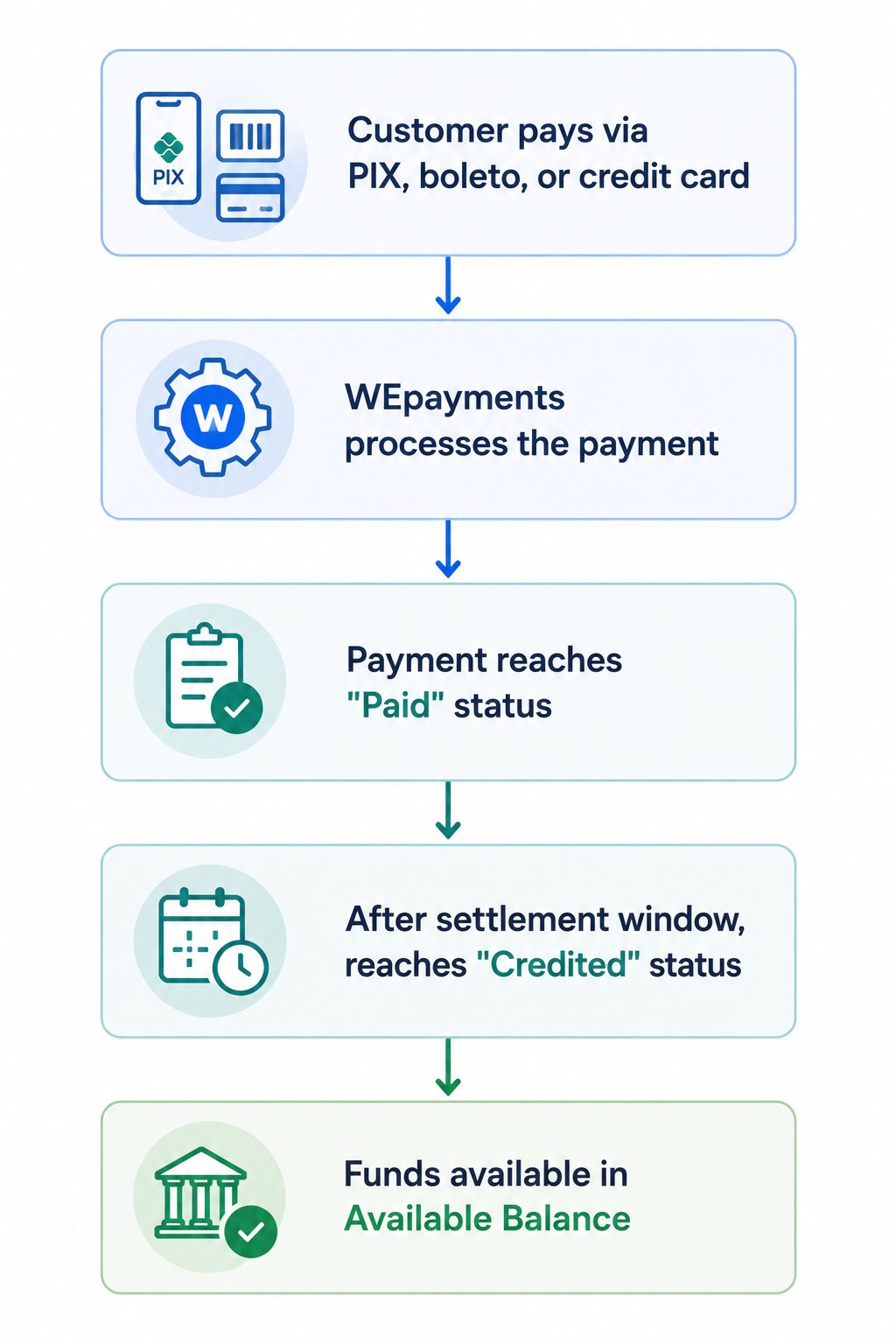
Payin is our **incoming payment solution** that enables your website, app, or platform to issue and manage payments in Brazil through:
| **Payment method** | **Description** |
| :------------------ | :--------------------------------------------------------------------------------------------------- |
| **Credit Card** | Visa, Mastercard, Elo, Hipercard, Diners Club, American Express – with installment options up to 12x |
| **PIX** | Instant payments 24/7 via dynamic QR Code or copy-paste link |
| **Boleto Bancário** | Traditional bank slip – widely used, settlement in D+1 |
> 💡 Through processor redundancy, we ensure your checkout will be 100% online. For international companies, Payin comes with FX solutions for currency exchange and settlement in any foreign currency.
### **Payin flow (simplified)**
 ## What is Payout?
Payout is our **outgoing payment solution** designed for companies that need to make mass payments to beneficiaries, associates, and suppliers in Brazil.
| **Feature** | **Description** |
| :----------------- | :--------------------------------------------------------------- |
| **Primary method** | PIX – instant payments 24/7 |
| **Alternative** | TED (bank transfer) – for amounts above R\$15,000 |
| **FX solutions** | For international companies |
| **Intelligence** | Maximizes payment conversion even with limited bank account data |
### Payout flow (step-by-step)
| **Step** | **Description** |
| :---------------------------- | :-------------------------------------------------------------------------- |
| **1. Add balance** | Top up your account via bank transfer or use available Payin balance |
| **2. Choose processing type** | Select individual Payout or mass payments |
| **3. Enter Payout details** | Provide payment details and amount, or use Data Collect for self-onboarding |
| **4. eFX (if applicable)** | WEpayments finds the best exchange rate and converts funds to BRL |
| **5. Processing** | WEpayments analyzes data – if correct, payment made via PIX or TED |
| **6. Management** | Monitor status via API or Dashboard, issue reports, download receipts |
## Unified statement (Account > Statement)
The **Unified Statement** brings together all financial movements of your account in one place:
| **What you see** | **Description** |
| :---------------------------------- | :--------------------------------------- |
| **Available balance** | Amount you can use immediately |
| **Balance awaiting release** | Funds held due to pending KYC/compliance |
| **Payin transactions** | Incoming payments (appear as credits) |
| **Payout transactions** | Outgoing payments (appear as debits) |
| **Fees** | Transaction fees and adjustments |
| **Future credit card installments** | Month-by-month expected receipts |
### How to access
1. Go to **Account** in the left sidebar
2. Click **Statement**
3. Select a period (required)
4. Apply filters as needed (WE ID, category)
5. Download or view results
## Settlements (withdrawals)
The **Settlements** screen allows you to request withdrawals and transfer balance between wallets.
### How to create a settlement
| **Field** | **Description** |
| :-------------------- | :----------------------------------------------------------- |
| **Merchant** | Select your registered company name |
| **Recipient** | If you have sub-wallets, select the sub-wallet (optional) |
| **Amount** | Enter amount to withdraw (must not exceed Available Balance) |
| **Create settlement** | Click to submit |
### Balance types
| **Balance** | **Description** |
| :-------------------- | :----------------------------------------------------------------------------------- |
| **Total balance** | All amounts from charges that have been credited + charges paid but not yet credited |
| **Available balance** | Amount actually available for withdrawal |
## End-to-end operation summary
### For receiving money (Payin)
| **Phase** | **Action** |
| :------------------ | :-------------------------------------------- |
| **Integration** | Integrate via API or use Dashboard |
| **Charge creation** | Generate charge for customer |
| **Payment** | Customer pays via PIX, boleto, or credit card |
| **Settlement** | Funds reach "Credited" status |
| **Withdrawal** | Request settlement to withdraw funds |
### For sending money (Payout)
| **Phase** | **Action** |
| :------------------- | :------------------------------------- |
| **Balance** | Add funds via deposit or Payin balance |
| **Data collection** | Use Data Collect or manual entry |
| **Payment creation** | Create individual or mass payment |
| **Processing** | WEpayments validates and executes |
| **Monitoring** | Track status via Dashboard or API |
## What is Payout?
Payout is our **outgoing payment solution** designed for companies that need to make mass payments to beneficiaries, associates, and suppliers in Brazil.
| **Feature** | **Description** |
| :----------------- | :--------------------------------------------------------------- |
| **Primary method** | PIX – instant payments 24/7 |
| **Alternative** | TED (bank transfer) – for amounts above R\$15,000 |
| **FX solutions** | For international companies |
| **Intelligence** | Maximizes payment conversion even with limited bank account data |
### Payout flow (step-by-step)
| **Step** | **Description** |
| :---------------------------- | :-------------------------------------------------------------------------- |
| **1. Add balance** | Top up your account via bank transfer or use available Payin balance |
| **2. Choose processing type** | Select individual Payout or mass payments |
| **3. Enter Payout details** | Provide payment details and amount, or use Data Collect for self-onboarding |
| **4. eFX (if applicable)** | WEpayments finds the best exchange rate and converts funds to BRL |
| **5. Processing** | WEpayments analyzes data – if correct, payment made via PIX or TED |
| **6. Management** | Monitor status via API or Dashboard, issue reports, download receipts |
## Unified statement (Account > Statement)
The **Unified Statement** brings together all financial movements of your account in one place:
| **What you see** | **Description** |
| :---------------------------------- | :--------------------------------------- |
| **Available balance** | Amount you can use immediately |
| **Balance awaiting release** | Funds held due to pending KYC/compliance |
| **Payin transactions** | Incoming payments (appear as credits) |
| **Payout transactions** | Outgoing payments (appear as debits) |
| **Fees** | Transaction fees and adjustments |
| **Future credit card installments** | Month-by-month expected receipts |
### How to access
1. Go to **Account** in the left sidebar
2. Click **Statement**
3. Select a period (required)
4. Apply filters as needed (WE ID, category)
5. Download or view results
## Settlements (withdrawals)
The **Settlements** screen allows you to request withdrawals and transfer balance between wallets.
### How to create a settlement
| **Field** | **Description** |
| :-------------------- | :----------------------------------------------------------- |
| **Merchant** | Select your registered company name |
| **Recipient** | If you have sub-wallets, select the sub-wallet (optional) |
| **Amount** | Enter amount to withdraw (must not exceed Available Balance) |
| **Create settlement** | Click to submit |
### Balance types
| **Balance** | **Description** |
| :-------------------- | :----------------------------------------------------------------------------------- |
| **Total balance** | All amounts from charges that have been credited + charges paid but not yet credited |
| **Available balance** | Amount actually available for withdrawal |
## End-to-end operation summary
### For receiving money (Payin)
| **Phase** | **Action** |
| :------------------ | :-------------------------------------------- |
| **Integration** | Integrate via API or use Dashboard |
| **Charge creation** | Generate charge for customer |
| **Payment** | Customer pays via PIX, boleto, or credit card |
| **Settlement** | Funds reach "Credited" status |
| **Withdrawal** | Request settlement to withdraw funds |
### For sending money (Payout)
| **Phase** | **Action** |
| :------------------- | :------------------------------------- |
| **Balance** | Add funds via deposit or Payin balance |
| **Data collection** | Use Data Collect or manual entry |
| **Payment creation** | Create individual or mass payment |
| **Processing** | WEpayments validates and executes |
| **Monitoring** | Track status via Dashboard or API |