> ## Documentation Index
> Fetch the complete documentation index at: https://support.wepayments.com.br/llms.txt
> Use this file to discover all available pages before exploring further.
# MarkUp: What it is and How to use
**Markup** is a feature that allows a main merchant to generate revenue from transactions processed by their sub-merchants. It was designed for businesses that operate with franchises, partners, or any hierarchical structure where a main merchant manages the financial operation.
## **How Markup works**
Under the markup billing model, WEpayments charges operational fees **only to the main merchant**. Sub-merchants do not have their own fees configured with the platform. Instead, monetization happens through a markup applied to each charge (Payin) or payout created by sub-merchants.
### **Simple explanation**
| **Step** | **What happens** |
| :------- | :--------------------------------------------------------------------------- |
| 1 | Sub-merchant processes a transaction |
| 2 | System applies the defined markup |
| 3 | Corresponding amount is automatically credited to the main merchant's wallet |
## **Who can use Markup?**
The Markup product is available exclusively to merchants with the **markup billing model enabled** on their products.
### **Eligibility**
| **Criteria** | **Details** |
| :-------------------------- | :------------------------------------------------------- |
| **Availability** | Exclusive to merchants with markup billing model enabled |
| **Applicable transactions** | Only transactions created by **sub-merchants** |
| **Not applicable** | Charges or payouts created directly by the main merchant |
### **Ideal for companies that:**
* Provide payment infrastructure to partners
* Want to scale their monetization model efficiently
* Operate with franchises, affiliates, or sub-partners
* Need separate revenue streams for parent company and sub-entities
## **How Markup can be applied**
The product supports **two ways** of applying revenue, offering both flexibility and predictability.
### **1. Global Markup (Default)**
A standard rule configured at the main merchant level.
| **Aspect** | **Description** |
| :--------------- | :------------------------------------------------------------------------------------------- |
| **When applied** | Whenever a transaction is created by a sub-merchant and no specific markup value is provided |
| **Behavior** | System automatically applies the global markup |
| **Use case** | Baseline monetization rule – ensures all transactions generate revenue |
### **2. Inline Markup**
Sent directly when creating a charge or payout.
| **Aspect** | **Description** |
| :--------------- | :----------------------------------------------------------------------------- |
| **When applied** | Merchant defines exact markup amount for a specific transaction |
| **Format** | Percentage-based or fixed amount |
| **Use case** | Special negotiations, campaigns, specific rules by product, region, or partner |
| **Priority** | Always overrides the global markup for that transaction |
### **Global vs. Inline Markup comparison**
| **Feature** | **Global Markup** | **Inline Markup** |
| :---------------------- | :------------------------------- | :---------------------------------- |
| **Configuration level** | Main merchant (default rule) | Per transaction |
| **Flexibility** | Fixed baseline | Highly flexible |
| **Override behavior** | Used when no inline is provided | Overrides global markup |
| **Best for** | Standard, recurring transactions | Special campaigns, negotiated deals |
| **Format** | Percentage or fixed | Percentage or fixed |
## How to configurate?
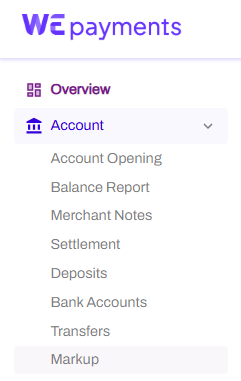
In your Portal you'll go to the section "MarkUp" inside "Account", there, you will chose your account and setup the Global Markup.
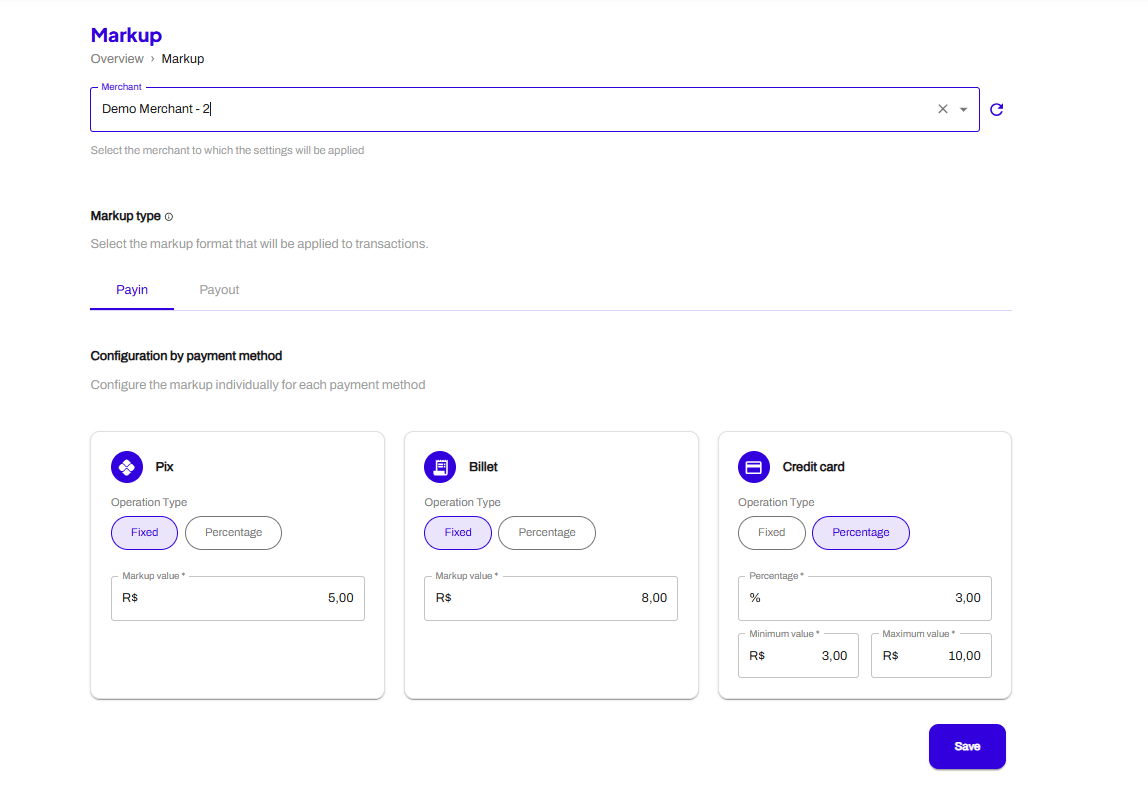 You will chose your MID and add the MarkUp value on each payment method available. Then you will save and all the transactions will have the MarkUp available.
## **What happens financially?**
After a sub-merchant's transaction is settled, the system automatically performs the financial allocation:
### **Financial flow**
| **Step** | **Effect** |
| :----------------------------- | :-------------------------------- |
| **Markup amount deducted** | From the sub-merchant |
| **Markup amount credited** | To the main merchant's wallet |
| **WEpayments operational fee** | Charged only to the main merchant |
### **How it appears in statements**
| **Statement type** | **How markup appears** |
| :-------------------------- | :----------------------------------------------- |
| **Sub-merchant statement** | Separate line identified as **"Markup"** (debit) |
| **Main merchant statement** | Credit corresponding to the transaction revenue |
## **Example scenarios**
### **Scenario 1: Payin (receiving payment)**
#### **Setup**
* **Main merchant:** Your company
* **Sub-merchant:** Your client
* **Global markup:** 2%
* **Transaction amount:** R\$ 1,000
#### **What happens**
| **Event** | **Amount** | **Who receives/pays** |
| :------------------------------- | :--------- | :------------------------- |
| Customer pays R\$ 1,000 | +R\$ 1,000 | Sub-merchant (gross) |
| Markup (2%) applied | -R\$ 20 | Deducted from sub-merchant |
| Markup credited to main merchant | +R\$ 20 | Main merchant |
| WE fee charged | -Variable | Main merchant only |
#### **Net result**
| **Party** | **Net amount** |
| :---------------- | :------------------------------------ |
| **Sub-merchant** | R\$ 980 (after markup) |
| **Main merchant** | R\$ 20 (markup revenue) minus WE fees |
### **Scenario 2: Payout (sending payment)**
#### **Setup**
* **Main merchant:** Your company
* **Sub-merchant:** Your client
* **Markup type:** Fixed
* **Payout amount:** BRL 100.00
* **Markup amount:** BRL 1.00 (fixed)
#### **What happens financially**
When the payout is processed, the following amounts are debited from the sub-merchant's wallet:
| **Debit** | **Amount** | **Description** |
| :---------------- | :---------- | :----------------------------------------------------- |
| **Payout amount** | -BRL 100.00 | Corresponding to the payout sent to the beneficiary |
| **Markup amount** | -BRL 1.00 | Corresponding to the markup applied to the transaction |
#### **Net result**
| **Party** | **Net amount** | **Calculation** |
| :------------------ | :------------------ | :-------------------------------------------- |
| **Sub-merchant** | - BRL 101.00 | BRL 100.00 (payout) + BRL 1.00 (markup) |
| **Bamboo (Master)** | + BRL 1.00 - WE fee | BRL 1.00 (markup credit) - WE operational fee |
#### **Wallet impact summary**
| **Wallet** | **Description** | **Amount** |
| :--------------- | :------------------------------- | :--------------------------------------------------------- |
| **Sub-merchant** | Payout debit | - BRL 100.00 |
| **Sub-merchant** | Markup debit | - BRL 1.00 |
| **Master** | Markup credit | + BRL 1.00 |
| **Master** | WEpayments operational fee debit | Fixed amount and/or percentage defined in commercial terms |
> 💡 The WEpayments operational fee is charged only to the main merchant, never to the sub-merchant.
## **Use cases**
| **Business model** | **How Markup helps** |
| :------------------------ | :-------------------------------------------- |
| **Franchises** | Franchisor earns from franchisee transactions |
| **Marketplaces** | Platform earns from seller transactions |
| **Payment facilitators** | Facilitator earns from sub-merchant volume |
| **Affiliate networks** | Network owner earns from affiliate sales |
| **White-label solutions** | Provider earns from partner transactions |
## **Important notes**
| **Note** | **Details** |
| :----------------------------- | :--------------------------------------------------------------------- |
| **Main merchant transactions** | Not subject to markup (only sub-merchant transactions) |
| **Inline markup priority** | Always overrides global markup |
| **WE fees** | Charged only to main merchant |
| **Sub-merchant fees** | Sub-merchants have no direct fee configuration with WEpayments |
| **Payout markup** | Applies to both Payin and Payout transactions created by sub-merchants |
## **Next steps**
* **Enable Markup:** Contact our support team or your account manager to enable the markup billing model
* **API integration:** Check our API documentation for inline markup fields when creating charges or payouts
* **Dashboard configuration:** Set your global markup in the Dashboard under merchant settings
## **Frequently Asked Questions (FAQ)**
**1. Can a sub-merchant have its own markup configuration?**\
No. Markup is configured at the main merchant level. Sub-merchants cannot set or override markup rules.
**2. What happens if both global and inline markup are provided?**\
The inline markup overrides the global markup for that specific transaction.
**3. Is markup applied before or after WE fees?**\
Markup is applied to the transaction amount. WE fees are charged separately to the main merchant.
**4. Can markup be a fixed amount instead of a percentage?**\
Yes. Both global and inline markup support fixed amounts or percentages.
**5. Does markup apply to both Payin and Payout?**\
Yes. Markup applies to any transaction created by sub-merchants – both incoming (Payin) and outgoing (Payout).
**6. How does markup appear in API responses?**\
Markup information is included in transaction objects and statement endpoints. Check our API documentation for specific fields.
**7. Can I change the global markup after transactions are already processing?**\
Yes, but changes apply only to new transactions. Already processed transactions are not affected.
**8. Is markup visible to the end customer?**\
No. Markup is a commercial arrangement between main merchant and sub-merchant. End customers see only the transaction amount.
##
You will chose your MID and add the MarkUp value on each payment method available. Then you will save and all the transactions will have the MarkUp available.
## **What happens financially?**
After a sub-merchant's transaction is settled, the system automatically performs the financial allocation:
### **Financial flow**
| **Step** | **Effect** |
| :----------------------------- | :-------------------------------- |
| **Markup amount deducted** | From the sub-merchant |
| **Markup amount credited** | To the main merchant's wallet |
| **WEpayments operational fee** | Charged only to the main merchant |
### **How it appears in statements**
| **Statement type** | **How markup appears** |
| :-------------------------- | :----------------------------------------------- |
| **Sub-merchant statement** | Separate line identified as **"Markup"** (debit) |
| **Main merchant statement** | Credit corresponding to the transaction revenue |
## **Example scenarios**
### **Scenario 1: Payin (receiving payment)**
#### **Setup**
* **Main merchant:** Your company
* **Sub-merchant:** Your client
* **Global markup:** 2%
* **Transaction amount:** R\$ 1,000
#### **What happens**
| **Event** | **Amount** | **Who receives/pays** |
| :------------------------------- | :--------- | :------------------------- |
| Customer pays R\$ 1,000 | +R\$ 1,000 | Sub-merchant (gross) |
| Markup (2%) applied | -R\$ 20 | Deducted from sub-merchant |
| Markup credited to main merchant | +R\$ 20 | Main merchant |
| WE fee charged | -Variable | Main merchant only |
#### **Net result**
| **Party** | **Net amount** |
| :---------------- | :------------------------------------ |
| **Sub-merchant** | R\$ 980 (after markup) |
| **Main merchant** | R\$ 20 (markup revenue) minus WE fees |
### **Scenario 2: Payout (sending payment)**
#### **Setup**
* **Main merchant:** Your company
* **Sub-merchant:** Your client
* **Markup type:** Fixed
* **Payout amount:** BRL 100.00
* **Markup amount:** BRL 1.00 (fixed)
#### **What happens financially**
When the payout is processed, the following amounts are debited from the sub-merchant's wallet:
| **Debit** | **Amount** | **Description** |
| :---------------- | :---------- | :----------------------------------------------------- |
| **Payout amount** | -BRL 100.00 | Corresponding to the payout sent to the beneficiary |
| **Markup amount** | -BRL 1.00 | Corresponding to the markup applied to the transaction |
#### **Net result**
| **Party** | **Net amount** | **Calculation** |
| :------------------ | :------------------ | :-------------------------------------------- |
| **Sub-merchant** | - BRL 101.00 | BRL 100.00 (payout) + BRL 1.00 (markup) |
| **Bamboo (Master)** | + BRL 1.00 - WE fee | BRL 1.00 (markup credit) - WE operational fee |
#### **Wallet impact summary**
| **Wallet** | **Description** | **Amount** |
| :--------------- | :------------------------------- | :--------------------------------------------------------- |
| **Sub-merchant** | Payout debit | - BRL 100.00 |
| **Sub-merchant** | Markup debit | - BRL 1.00 |
| **Master** | Markup credit | + BRL 1.00 |
| **Master** | WEpayments operational fee debit | Fixed amount and/or percentage defined in commercial terms |
> 💡 The WEpayments operational fee is charged only to the main merchant, never to the sub-merchant.
## **Use cases**
| **Business model** | **How Markup helps** |
| :------------------------ | :-------------------------------------------- |
| **Franchises** | Franchisor earns from franchisee transactions |
| **Marketplaces** | Platform earns from seller transactions |
| **Payment facilitators** | Facilitator earns from sub-merchant volume |
| **Affiliate networks** | Network owner earns from affiliate sales |
| **White-label solutions** | Provider earns from partner transactions |
## **Important notes**
| **Note** | **Details** |
| :----------------------------- | :--------------------------------------------------------------------- |
| **Main merchant transactions** | Not subject to markup (only sub-merchant transactions) |
| **Inline markup priority** | Always overrides global markup |
| **WE fees** | Charged only to main merchant |
| **Sub-merchant fees** | Sub-merchants have no direct fee configuration with WEpayments |
| **Payout markup** | Applies to both Payin and Payout transactions created by sub-merchants |
## **Next steps**
* **Enable Markup:** Contact our support team or your account manager to enable the markup billing model
* **API integration:** Check our API documentation for inline markup fields when creating charges or payouts
* **Dashboard configuration:** Set your global markup in the Dashboard under merchant settings
## **Frequently Asked Questions (FAQ)**
**1. Can a sub-merchant have its own markup configuration?**\
No. Markup is configured at the main merchant level. Sub-merchants cannot set or override markup rules.
**2. What happens if both global and inline markup are provided?**\
The inline markup overrides the global markup for that specific transaction.
**3. Is markup applied before or after WE fees?**\
Markup is applied to the transaction amount. WE fees are charged separately to the main merchant.
**4. Can markup be a fixed amount instead of a percentage?**\
Yes. Both global and inline markup support fixed amounts or percentages.
**5. Does markup apply to both Payin and Payout?**\
Yes. Markup applies to any transaction created by sub-merchants – both incoming (Payin) and outgoing (Payout).
**6. How does markup appear in API responses?**\
Markup information is included in transaction objects and statement endpoints. Check our API documentation for specific fields.
**7. Can I change the global markup after transactions are already processing?**\
Yes, but changes apply only to new transactions. Already processed transactions are not affected.
**8. Is markup visible to the end customer?**\
No. Markup is a commercial arrangement between main merchant and sub-merchant. End customers see only the transaction amount.
##